或許我們一個頁面有需要用到多個文本編輯器的情況,那我們該怎么辦呢?
本人查閱了很多資料最后終于找到一種方法,可以通過自定義編輯器的工具欄items屬性,來實現:
直接上JS了:
<span class="lspan"><font color="red">*</font>商品信息:</span><%--<span class="lspan">
<input id="txtProductInfo" placeholder="請輸入商品信息" value="<%=product.ProductInfo %>"
                                                name="txtProductInfo"
 type="text" maxlength="25" style="width: 444px" /></span>--%>
<script type="text/javascript">
        KindEditor.ready(function (K) {
        editor = K.create(’#txtProductInfo’, {
        cssPath: ’../kindeditorx/plugins/code/prettify.css’,
        uploadJson: ’../kindeditorx/asp.net/upload_json.ashx’,
        fileManagerJson: ’../kindeditorx/asp.net/file_manager_json.ashx’,
        minWidth: 444,
        minHeight: 200,
        maxWidth: 444,
        resizeType: 1,
        filterMode: false,
        allowFileManager: true,
        items: [’source’, ’|’, ’undo’, ’redo’, ’|’, ’justifyleft’,
’justifycenter’, ’justifyright’,
               ’justifyfull’, ’insertorderedlist’, ’insertunorderedlist’,
’indent’, ’outdent’, ’subscript’, ’superscript’,
                ’clearhtml’, ’quickformat’, ’selectall’, ’|’,
’fullscreen’, ’|’, ’forecolor’,’hilitecolor’,’bold’,’italic’
                ,’underline’,’strikethrough’,’lineheight’,’removeformat’
               ]
        });
});
</script>
<textarea id="txtProductInfo" rows="5" cols="" style="width: 400px;">
<%=product.ProductInfo %></textarea>
重點:
下面這些自定義顯示工具是關鍵,其他的編輯器只需要修改items屬性就可以了。
items: [’source’, ’|’, ’undo’, ’redo’, ’|’, ’justifyleft’, ’justifycenter’,
 ’justifyright’,
               ’justifyfull’, ’insertorderedlist’, ’insertunorderedlist’, ’indent’,
 ’outdent’, ’subscript’, ’superscript’,
                ’clearhtml’, ’quickformat’, ’selectall’, ’|’, ’fullscreen’, ’|’,
’forecolor’,’hilitecolor’,’bold’,’italic’
                ,’underline’,’strikethrough’,’lineheight’,’removeformat’
               ]
        });
如下效果圖:
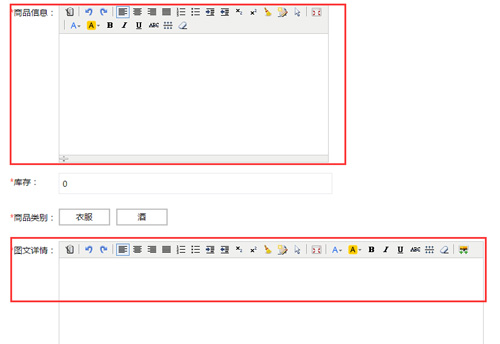
關于items參數的解釋如下:
| source | HTML代碼 |
| preview | 預覽 |
| undo | 后退 |
| redo | 前進 |
| cut | 剪切 |
| copy | 復制 |
| paste | 粘貼 |
| plainpaste | 粘貼為無格式文本 |
| wordpaste | 從Word粘貼 |
| selectall | 全選 |
| justifyleft | 左對齊 |
| justifycenter | 居中 |
| justifyright | 右對齊 |
| justifyfull | 兩端對齊 |
| insertorderedlist | 編號 |
| insertunorderedlist | 項目符號 |
| indent | 增加縮進 |
| outdent | 減少縮進 |
| subscript | 下標 |
| superscript | 上標 |
| formatblock | 段落 |
| fontname | 字體 |
| fontsize | 文字大小 |
| forecolor | 文字顏色 |
| hilitecolor | 文字背景 |
| bold | 粗體 |
| italic | 斜體 |
| underline | 下劃線 |
| strikethrough | 刪除線 |
| removeformat | 刪除格式 |
| image | 圖片 |
| flash | Flash |
| media | 視音頻 |
| table | 表格 |
| hr | 插入橫線 |
| emoticons | 插入表情 |
| link | 超級鏈接 |
| unlink | 取消超級鏈接 |
| fullscreen | 全屏顯示 |
| about | 關于 |
| 打印 | |
| code | 插入程序代碼 |
| map | Google地圖 |
| baidumap | 百度地圖 |
| lineheight | 行距 |
| clearhtml | 清理HTML代碼 |
| pagebreak | 插入分頁符 |
| quickformat | 一鍵排版 |
| insertfile | 插入文件 |
| template | 插入模板 |
| anchor | 插入錨點 |

【 微信掃一掃 】


